


Barcoding FAQ: Barcodes, Scanners, Label Printers & ID Cards
Author: POS'99 Date Posted:9 December 2022
Your questions answered: barcodes, GS1 numbers, label printing, scanners, mobile computers and ID cards
How barcodes work GS1 & retail barcodes Printing barcodes Barcode scanners Mobile computers ID card printers
New to barcoding? This guide covers the questions we're asked most, from how a barcode works and how to get one for your products, through to choosing a label printer, scanner, mobile computer or ID card printer.
How barcodes work
So how does a barcode work?
A barcode stores information in a visual pattern that a machine can read. Each combination of black and white bars (called elements) represents characters, following a fixed set of rules for that barcode type. Change the sequence of elements and you get different text. A barcode scanner reads the pattern and turns it into a line of text your computer can use.
Is the price included in the barcode?
Usually not. A barcode can hold any text you like, but standard product barcodes only identify which product it is. Your point of sale software or database holds the price linked to that product ID.
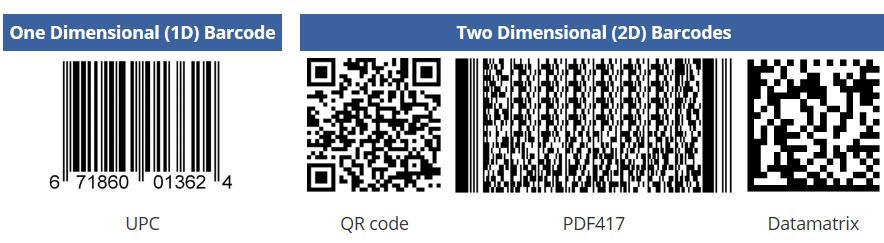
What's the difference between 1D (linear) and 2D barcodes?
| 1D (linear) The familiar striped barcode. Information runs left to right. Some types encode numbers only, others any keyboard character. Readable by any barcode scanner. |
2D (e.g. QR code) Information is stored both horizontally and vertically, so it holds far more data in less space. Needs a 2D imager scanner to read. |
How many characters fit into a barcode?
It depends on the barcode type. A 1D barcode typically holds around 20 to 25 characters, while 2D barcodes can hold 2,000 or more. The more data you add, the bigger the barcode gets, especially with 1D codes, so most people encode 8 to 15 characters.
What's the smallest I can make a barcode?
A 2D code can be as small as about 9 mm × 9 mm. The trade-off is that a tiny code holds fewer characters, is harder for scanners to read, and needs a high-resolution label printer (300 or 600 dpi) to print cleanly.
Retail barcodes and GS1 numbers
Who needs a registered barcode number?
If you supply products to a distributor or retailer, you'll most likely need a registered GS1 barcode. Check the retailer's policy if you're unsure. When you register, you receive a certificate confirming your numbers; most retailers ask for it to verify your numbers are unique and authorised.
| How you sell | Need a GS1 barcode? |
| Through a distributor or retailer | Most of the time |
| Through a major national chain | Always |
| Tracking internal inventory | No |
| Selling directly to customers | No |
How do I get a barcode number in Australia, and what does it cost?
GS1 Australia issues a globally unique GS1 Company Prefix, which you use to create barcode numbers for your products. Fees depend on how many products you need to number and your annual turnover, so contact GS1 Australia for an exact price.
What does a retail barcode number contain?
In Australia, most retail products carry an EAN-13 barcode (13 digits). The UPC-A barcode (12 digits) is its North American equivalent. Either way, the number is called a GTIN (Global Trade Item Number) and is made up of three parts:
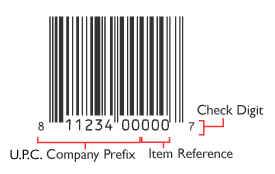
✔ Company prefix: assigned to you by GS1 Australia. The more products you have, the shorter your prefix, leaving more digits free for products. It identifies you as the brand owner, including in EDI (Electronic Data Interchange).
✔ Item reference: the number you assign to each individual product. You choose this, not GS1.
✔ Check digit: the last digit, calculated from all the digits before it. Your barcode label software calculates it for you.
Printing your own retail barcodes: once you have your GS1 numbers, POS99 can help you choose a barcode label printer, barcode software and barcode labels, plus a compatible scanner. For more background, see Universal Product Code on Wikipedia.
Printing barcodes
What's the difference between direct thermal (DT) and thermal transfer (TT)?
| Direct thermal Uses heat-sensitive labels, with no ribbon or ink. Simple and low cost, but the print can fade within about 12 months and doesn't suit heat or sunlight. Shop DT labels |
Thermal transfer Uses a ribbon to transfer ink onto the label. The print is permanent and won't fade. Shop TT labels and ribbons |
What is DPI?
Dots per inch (DPI) measures a printer's resolution: the higher the number, the finer the print. 203 dpi suits most applications, but choose 300 or 600 dpi for logos, images or very small labels.
How many labels are on a roll?
It depends on the label height: the shorter the label, the more you get per roll.
How do I make a barcode label?
You need a label printer, labels and label design software. The software lets you place barcodes, text and images on your label, then prints it to your label printer.
What's a dispenser?
A dispenser (or peeler) is an accessory available for most label printers. It peels the backing off each label as it comes out of the printer, saving time when you apply labels straight after printing. It can be switched off when not needed.
What's the difference between desktop and industrial printers?
| Desktop Compact printers for lower volumes, such as office labelling or a small retail store. Shop desktop |
Industrial (tabletop) Built for hundreds or thousands of labels a day, with tougher construction for harsher environments. Shop industrial |
Barcode scanners
How does a barcode scanner work?
The scanner reads the pattern of black and white elements and converts it into text. It sends that text to your computer just like a keyboard would, so the result appears wherever your cursor is in the application you're using (try it in Notepad).
Do I need special software to use a scanner?
No. Most barcode scanners work as a keyboard, so your computer recognises them as a standard input device with no extra software or drivers.
What's the range of a cordless barcode scanner?
It varies by model. Most cordless scanners use Class 2 Bluetooth, with a range of about 10 metres. Some rugged models use Class 1 Bluetooth, reaching up to around 100 metres.
Can I read a barcode from a computer or phone screen?
Yes, with a 2D imager scanner, which captures an image of the barcode. A basic laser scanner relies on reflected light and can't read barcodes on screens.
Can my scanner read 2D barcodes?
Only if it's a 2D imager. A laser scanner reads by bouncing light off the bars, and only horizontally. An imager takes a picture of the barcode and decodes it, so it can read data stored both horizontally and vertically.
How long is the cable on most scanners?
Most corded scanners come with a cable of about 1.8 metres, and longer cables are available for most models.
Mobile computers
Do mobile computers come with software?
Mobile computers come with an operating system installed, but no business apps. You can add apps for mobile POS, stocktakes, asset tracking, warehouse management and more.
What operating system do they run?
Most current mobile computers run Android. Older models ran Windows Mobile or Windows CE, which aren't compatible with desktop Windows apps and are no longer supported, so they're worth replacing.
Can I get online with a mobile computer?
Yes, in two ways: Wi-Fi (802.11, the same wireless standard your laptop uses), or a mobile network with a SIM, as long as you're in coverage and have an active service.
ID card printers
What should I consider when buying an ID card printer?
Security & lamination Single or dual-sided Print volume Edge-to-edge printing Encoding
Does card volume affect which printer I need?
Yes. Card printers fall into three broad classes:
| Under 1,000 cardsValue The most economical option, compact with simpler features. Ideal for small print runs. |
1,000 to 10,000 cardsStandard A step up in features and reliability, with a moderate footprint. Suits small and medium businesses. |
10,000 to 30,000 cardsPremium The most robust printers, with more lamination and print options. Built for high volume and high security. |
Should I buy a single or dual-sided printer?
Single-sided printers suit cards with limited cardholder information. Dual-sided printers suit cards that carry more data, letting you move details to the back and keep the front uncluttered.
What's the difference between direct-to-card and reverse transfer?
| Direct-to-card (DTC) The most common method. The print head heats a ribbon to transfer colour straight onto the card, giving sharp edges, deep blacks and full colour. Leaves a small unprinted border, as printing too close to the edge can damage the print head. |
Reverse transfer Prints the image onto a film, which is then applied to the card. Gives true edge-to-edge coverage and a vibrant, durable finish. |
Do I need to laminate my ID cards?
✔ Durability: extra protection for cards used heavily or in harsh conditions
✔ Security: makes cards harder to counterfeit or tamper with
✔ Long-term savings: a higher upfront cost, offset by fewer reprints and security incidents
What encoding options are available?
| Magnetic stripe Stores data on a magnetic band, read by swiping the card through a reader. |
Contact smart card Gold-plated contact pads on the card connect when inserted into or touched to a reader. |
| Contactless smart card A rewritable chip that stores and processes data, communicating with a terminal by radio. |
UHF RFID (Gen 2) Read by radio at longer ranges, with multiple cards read at once. Highly secure. |
Talk to POS99
Starting out with barcodes or upgrading your setup? We'll help you choose the right printer, labels, scanner or card printer for your business. Call us on 1800 673 605.
Shop barcode scanners Shop label printers Contact usEssentially, a barcode encodes information in a visual pattern that is readable by a machine. The black and white bars (elements) combination, represents different text characters, which in turn follows a fixed algorithm for that barcode type. If you change the sequence of the elements you will get different text. The barcode scanner device reads this pattern of black and white and turns it into a line of text your computer can process and understand.