


203 vs 300 vs 600 dpi Label Printers: Which Resolution Do You Actually Need?
When you shop for a thermal label printer, the same model often comes in two or three versions. The only difference is the print resolution: 203, 300 or 600 DPI. The higher-resolution versions cost more. So is the upgrade worth it, or are you paying for detail nobody will notice?
The short answer: it depends on the smallest thing you need to print. That's usually a barcode bar or a line of small text. This guide explains what DPI means on a label, where each resolution makes sense, and how to choose without overspending.
What DPI means on a thermal printer
DPI stands for dots per inch. A thermal printhead is a single row of tiny heating elements. Each element prints one dot, and every character, logo and barcode on your label is built from those dots. More dots per inch means smaller dots, which gives sharper edges and finer detail.
| Resolution | Dots per mm | Size of one dot | Dots in 1 mm² |
|---|---|---|---|
| 203 DPI | 8 | ≈ 0.125 mm | ≈ 64 |
| 300 DPI | 11.8 | ≈ 0.085 mm | ≈ 140 |
| 600 DPI | 23.6 | ≈ 0.042 mm | ≈ 558 |
Going from 203 to 300 DPI gives you about twice as many dots in the same area. Going to 600 DPI gives you nearly nine times as many.
Why it matters most for barcodes
A printer can only make a barcode bar a whole number of dots wide. At 203 DPI, a bar can be 0.125 mm, 0.25 mm or 0.375 mm wide, but nothing in between. If your label software asks for a bar width that falls between those steps, the printer rounds it. Some bars come out wider and some narrower, and that inconsistency is exactly what makes a scanner struggle.
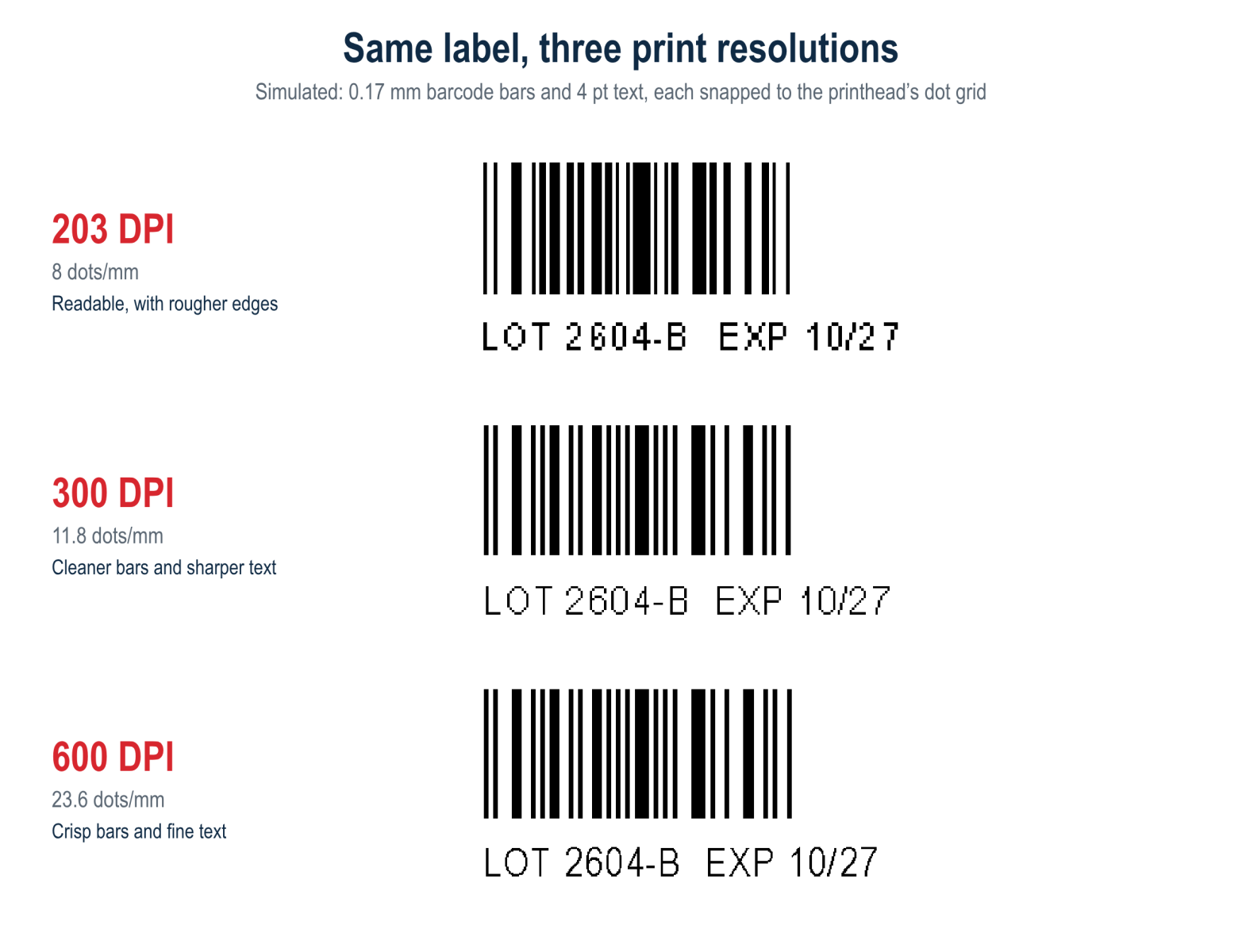
Large barcodes, such as the ones on shipping and carton labels, have plenty of room, so 203 DPI prints them reliably. Rounding becomes a problem when you shrink the barcode to fit a small product label, a jewellery tag or a component. At that point, higher resolution gives you finer width steps and much more accurate bars.
The same applies to 2D codes. A QR code or Data Matrix on a small label might use cells only a few tenths of a millimetre wide. At 203 DPI each cell is only two or three dots across, and any distortion makes the code harder to read.
Small text, logos and fine graphics
Text follows the same rule. At around 6 pt and above, 203 DPI text is perfectly readable. Below that, letters start to lose their shape: the gaps inside an "e" or "8" close up, and thin strokes break. At 300 DPI, 4 pt text stays legible. At 600 DPI, you can print micro-text that's hard to read without a magnifier.
Logos, fine lines and ingredient or nutrition panels also benefit from higher resolution. Curves come out smoother, and thin rules don't turn into jagged steps.
Where each resolution fits
203 DPI: the workhorse
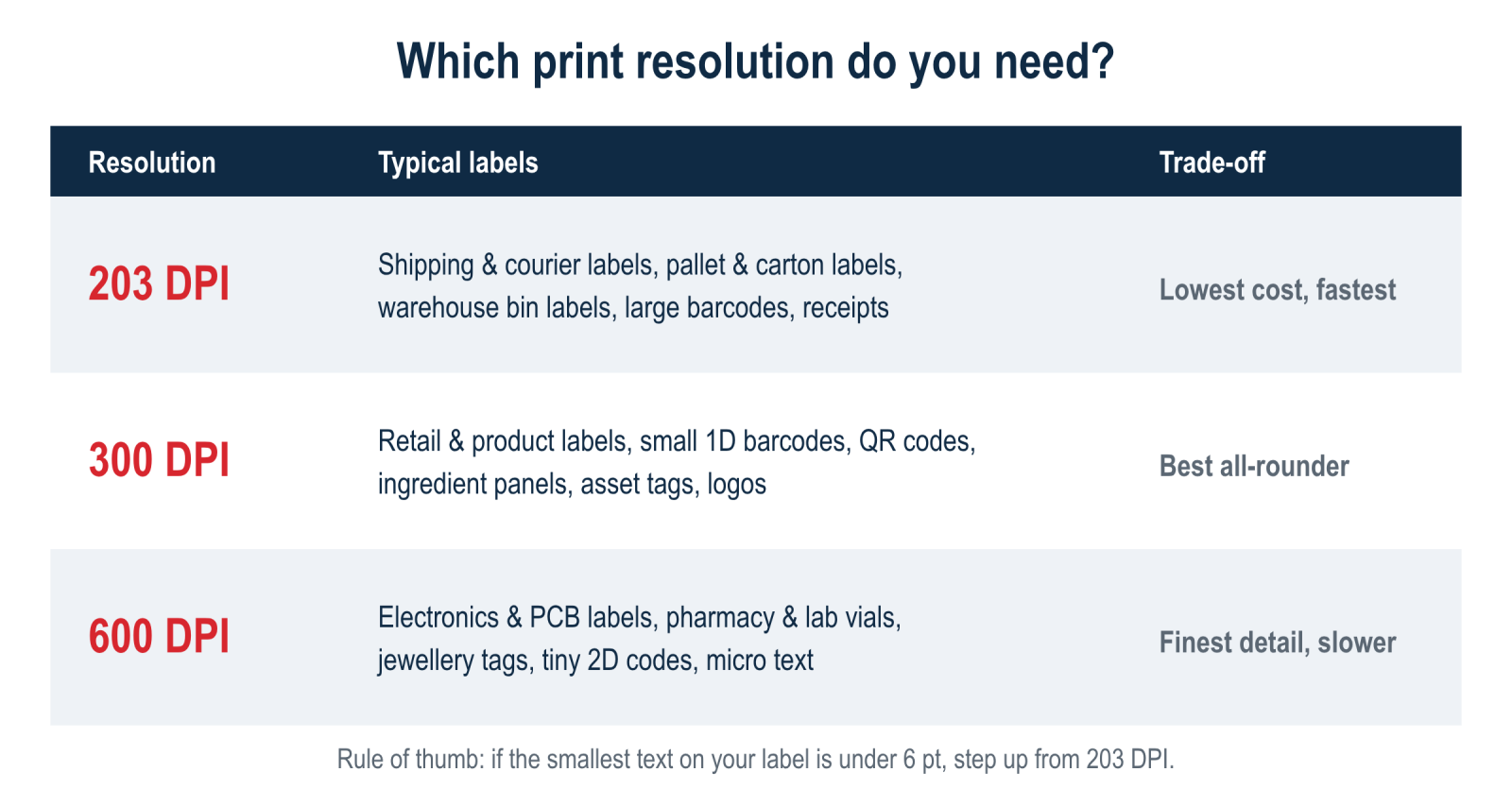
Best for shipping and courier labels (including 100 × 150 mm labels for Australia Post, StarTrack and other carriers), carton and pallet labels, warehouse bin and location labels, and simple barcodes with plenty of room. It's the lowest-cost option, usually the fastest, and printheads are cheaper to replace.
300 DPI: the best all-rounder
Best for retail and product labels, shelf labels, small 1D barcodes, QR codes, asset tags, and labels with logos or ingredient lists. If you print a mix of label types, or you're not sure what you'll need in a year's time, 300 DPI is usually the safest choice. The price difference over 203 DPI is often small compared to the cost of reprinting labels that don't scan.
600 DPI: for very small labels
Best for electronics and circuit-board labels, cable and component markers, pharmacy, lab and specimen labels, jewellery and optical tags, and tiny 2D codes. Only choose 600 DPI if your labels need it. These printers cost more, print more slowly, and their printheads are more expensive to replace.
The trade-offs: cost, speed and printhead life
- Purchase price: higher-resolution versions of the same printer cost more, and 600 DPI models carry the biggest premium.
- Print speed: more dots per line takes more processing and heating time, so top speeds usually drop as resolution increases.
- Printhead replacement: printheads wear out over time, and higher-resolution printheads cost more to replace.
- Media and ribbon: to get the full benefit of 300 or 600 DPI, use a smooth label face stock. For thermal transfer, use a good-quality wax/resin or resin ribbon. Fine detail on rough or uncoated paper won't look much better than it does at 203 DPI.
A few practical tips
- Check your smallest element. Measure the narrowest barcode bar or the smallest text on your label. If the text is under about 6 pt, or the barcode is being shrunk to fit, step up from 203 DPI.
- Set up the label in your software at the printer's resolution. If you change printers, select the correct driver or resolution in your label software. A design made for 300 DPI and printed on a 203 DPI printer can come out the wrong size or with reshaped barcodes.
- Use the printer's built-in barcode fonts instead of barcode images where you can. The printer then builds each bar to fit its own dot grid.
- Test-scan before you commit. Print a sample run and scan it with the scanner your customers or warehouse actually use.
Quick answers
Is 203 DPI good enough for shipping labels?
Yes. Standard courier and postage labels have large barcodes and text, and 203 DPI prints them reliably and quickly.
Will a 300 DPI printer make my shipping labels look better?
Slightly sharper, yes, but it won't make them scan any better. If you only print shipping labels, 203 DPI is the better-value choice.
Can I upgrade a printer's resolution later?
Some models offer a printhead conversion kit that changes the resolution, but it isn't available for every printer and can cost a fair share of a new unit. If you might need small labels later, it's usually cheaper to buy 300 DPI upfront.
Does DPI affect direct thermal and thermal transfer printing the same way?
Yes. Resolution is set by the printhead, not by the printing method. Thermal transfer with a good ribbon generally shows fine detail more cleanly and lasts longer.
Need help choosing?
POS99 stocks 203, 300 and 600 DPI label printers for every kind of business, browse our label printers, thermal transfer ribbons and labels, or contact our team. If you tell us what you're printing and we will recommend the right resolution, so you don't pay for more than you have to.